Lab project · In development
ETAPEEmuframe Tape Server
ETAPE is a virtual tape library for z/OS: the system sees 3480, 3490E and 3590 drives as if they were real, and each cartridge is a file on a server connected over TCP/IP. No tape hardware, integrated with OAM and DFSMSrmm, and tested with DFSMShsm and DFSMSdss (ADRDSSU).
My personal project for 2026: an HLASM driver working next to IOS, coded with AI under my direction, tested on z/OS and built with IBM's manuals as the reference.
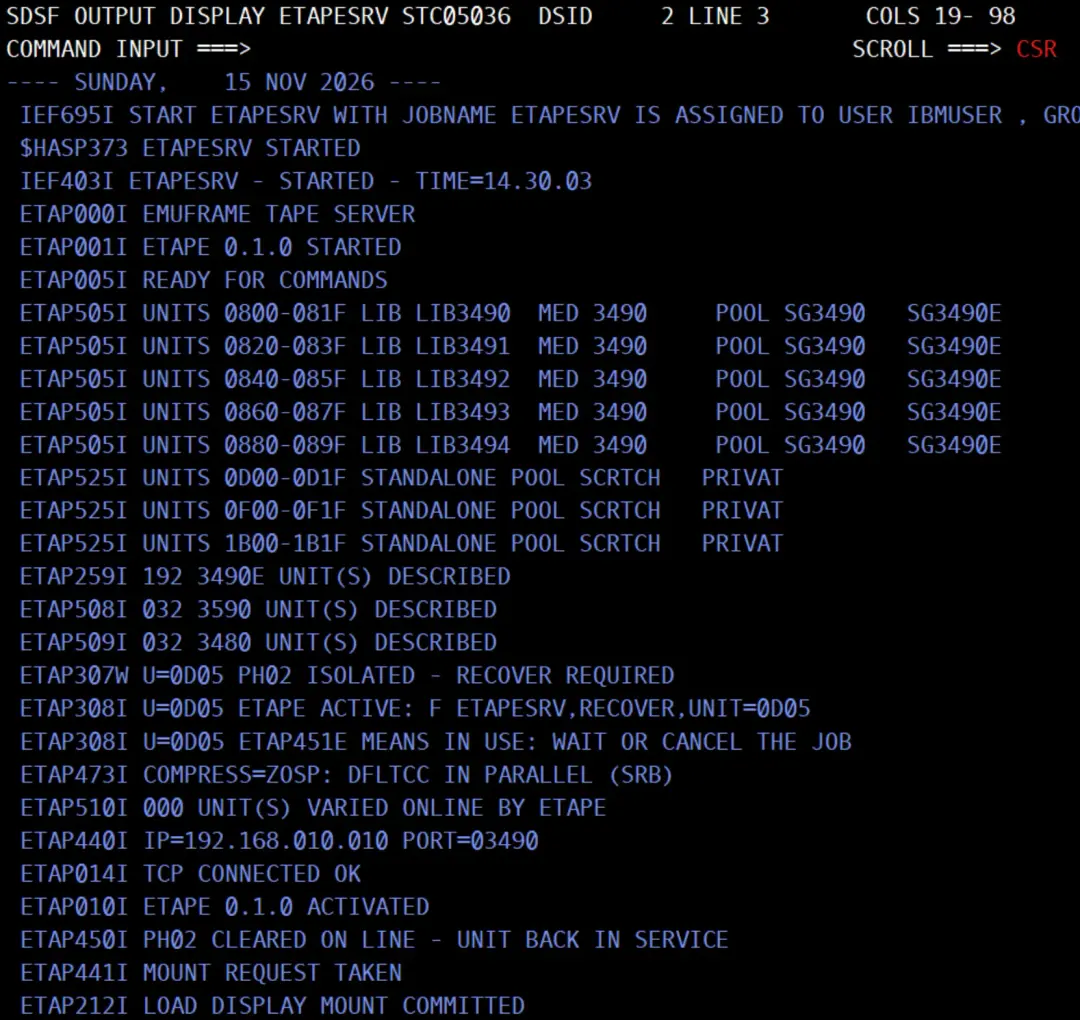
A job opens a tape data set, z/OS requests the mount and ETAPE answers it: it puts the volume in the drive, carries out what the program reads and writes, and unloads at the end. The programs do not change: BSAM, QSAM, EXCP and the usual utilities, such as IEBGENER or DFSORT, work as they do with a real drive.
ETAPE started in January 2026 and has taken up most of my year.
- regression runs
- 480+
- defects found and recorded
- 100+
- lines of test log
- 30,000+
- tokens written by AI (Oct 9 – Nov 15, 2026 alone)
- 42M+
A lab project
ETAPE is a personal learning project with no commercial intent. I started it to understand in depth how z/OS works with tapes (IOS, channel programs, OAM, DFSMSrmm, error recovery) and to write about it here. It is not an IBM product and is not related to IBM, and it is not distributed yet because it is still in development. It is not intended for production or enterprise use: for that there are commercial products with professional support.
What ETAPE does
3480, 3490E and 3590 drives
The three drive types with their media: MEDIA1 on the 3480, MEDIA1 and MEDIA2 on the 3490E, MEDIA3 and MEDIA4 on the 3590. Each media type has its cartridge capacity by default (200 MB to 20 GB), and it is configurable. The 3590 takes blocks of up to 256 KB. Also multivolume data sets (EOV) and several data sets on one tape.
Up to 256 drives
Up to 256 drives per z/OS, of any type and mixed, in at most 8 ranges. The Python server can serve several z/OS systems: I have tested it with two LPARs of 192 drives each, working at the same time.
z/OS 3.1 and 3.2
Tested on z/OS 3.1 and 3.2, in a lab with emulated z/OS (IBM ZD&T).
SMS libraries and DFSMSrmm
Drives can belong to an SMS tape library, with OAM and its storage groups, and the inventory is DFSMSrmm's. Specific and scratch mounts both work; scratch volumes come from the RMM pools. When RMM returns a volume to scratch, an exit tells the server, which can reclaim its disk space after a grace period.
Stand-alone drives
Drives with no library, no OAM and no DFSMSrmm. z/OS requests the mount as it does for any stand-alone drive (IEF233A) and ETAPE acts as the operator: it mounts the requested volume or, for a scratch request, one picked by the server, which keeps its own volume catalog.
Tested with DFSMSdss and DFSMShsm
Tested with DFSMSdss (ADRDSSU): DUMP and RESTORE, including full-volume disk dumps (DUMP FULL). And with the basic DFSMShsm cycle: migration to ML2, recall, backup and recover.
Integrity and audit
Every z/OS synchronization is confirmed on the server's disk. An interrupted write is never replayed blindly: the volume is held until the operator decides. Every data set opened and closed is logged with its job, DSN and volume.
Recovery without an IPL
A job that hangs on a drive is ended with CANCEL or with a command to the STC, and the drive goes back to work. If the STC fails, the next one picks up where it left off. No IPL.
High availability (in development)
Two server nodes on the same storage, with only one writing. z/OS knows both addresses and switches paths if it loses one; if a node goes down completely, the operator confirms the takeover.
Videos
On the YouTube channel Emuframe - ETAPE I show ETAPE at work in the lab, with tests of dozens of drives at once. The channel's latest videos are below.
Loading the channel's videos...
Open the Emuframe - ETAPE channel on YouTubeHow it works
z/OS
Applications unchanged
- Sees IBM 3480, 3490E and 3590 tape drives
- Issues mount requests and channel programs (CCWs), just as with a physical drive
- In SMS libraries (OAM and DFSMSrmm) or as stand-alone drives
ETAPESRV
z/OS STC linking the system to the Python server
- Handles mount requests automatically, with no operator action
- Processes the channel programs of the virtual drives
- A dedicated TCP/IP session per drive to the ETAPE server
ETAPE server
Python, outside z/OS
- Each volume is stored on disk as a tape image
- A persistent record of every volume's state, for integrity and recovery
- REST API and role-based administration web interface
- The mount. A job opens a tape data set and z/OS requests the mount. ETAPE receives the request as the operator or the robot would: it mounts the requested volume or, for a scratch request, one from the DFSMSrmm pools (in a library) or from the server (on a stand-alone drive).
- The data. IOS hands ETAPE every channel program (the CCWs that write, read or position). The ETAPESRV STC executes it and talks to the server over TCP/IP, with one session per drive; optionally, z/OS compresses the data before sending it. No command reaches a physical channel.
- The demount. At close, z/OS orders a rewind and unload. The server confirms what was written to disk, demounts the volume and the drive is free for the next mount.
Technical details: CCWs per drive type, how it fits into z/OS, and the server
Channel programs per drive type. ETAPE accepts the commands each drive model accepts and rejects the rest with command reject, as the real drive does. Status and sense (32 bytes, with their ERA code) follow each model's format. These are the commands (CCWs) it serves, as implemented in ETAPE's code:
| Command | Code | 3480 | 3490E | 3590 |
|---|---|---|---|---|
| Read and write | ||||
| Write | 01 | ✓ | ✓ | ✓ |
| Read Forward | 02 | ✓ | ✓ | ✓ |
| Read Forward (3590) | 06 | — | — | ✓ |
| Read Backward | 0C | ✓ | ✓ | ✓ |
| Read Previous | 0A | — | — | ✓ |
| Read Buffer | 12 | ✓ | ✓ | ✓ |
| Write Tape Mark | 1F | ✓ | ✓ | ✓ |
| Erase Gap | 17 | ✓ | ✓ | ✓ |
| Data Security Erase | 97 | ✓ | ✓ | ✓ |
| Synchronize | 43 | ✓ | ✓ | ✓ |
| Set Tape-Write-Immediate | C3 | ✓ | ✓ | ✓ |
| Positioning | ||||
| Rewind | 07 | ✓ | ✓ | ✓ |
| Rewind Unload | 0F | ✓ | ✓ | ✓ |
| Forward Space Block | 37 | ✓ | ✓ | ✓ |
| Backspace Block | 27 | ✓ | ✓ | ✓ |
| Forward Space File | 3F | ✓ | ✓ | ✓ |
| Backspace File | 2F | ✓ | ✓ | ✓ |
| Locate Block | 4F | ✓ | ✓ | ✓ |
| Read Block ID | 22 | ✓ | ✓ | ✓ |
| Control, status and identification | ||||
| No-Operation | 03 | ✓ | ✓ | ✓ |
| Channel Path No-Operation | 13 | — | ✓ | ✓ |
| Sense | 04 | ✓ | ✓ | ✓ |
| Sense ID | E4 | ✓ | ✓ | ✓ |
| Read Device Characteristics | 64 | ✓ | ✓ | ✓ |
| Read Configuration Data | FA | ✓ | ✓ | ✓ |
| Read Node Identifier | 3E | ✓ | ✓ | ✓ |
| Read Buffered Log | 24 | ✓ | ✓ | ✓ |
| Medium Sense | C2 | — | — | ✓ |
| Mode Set | DB | ✓ | ✓ | ✓ |
| Load Display | 9F | ✓ | ✓ | ✓ |
| Perform Subsystem Function | 77 | — | ✓ | — |
| Set Interface Identifier | 73 / 77 | — | 73 | 77 |
| Multiple paths and assignment | ||||
| Assign | B7 | ✓ | ✓ | ✓ |
| Unassign | C7 | ✓ | ✓ | ✓ |
| Control Access | E3 | ✓ | ✓ | ✓ |
| Set Path Group ID | AF | ✓ | ✓ | ✓ |
| Sense Path Group ID | 34 | ✓ | ✓ | ✓ |
| Suspend Multipath Reconnection | 5B | ✓ | ✓ | ✓ |
The Mode Set codes of other drive models (23, 2B, 33, 3B, 53, 63, 6B, 7B, 93, A3, AB, B3, BB and D3; also CB on the 3480 and 3490E, and 73 on the 3480) are accepted and do nothing, as on the hardware.
How it fits into z/OS.
- The drives are defined in HCD like any 3480, 3490 or 3590 tape drive. The STC varies them online when it activates, if they are not online already, and offline when it deactivates.
- ETAPE receives its drives' I/O requests before they reach the channel and completes them as the drive would, with its status and sense. No command reaches the hardware.
- It uses DFSMSdfp's OPEN, CLOSE and EOV installation exits and DFSMSrmm's EDG_EXIT200 exit.
- The libraries are OAM and SMS manual tape libraries (MTL). Scratch and volume state come from DFSMSrmm through its API (EDGXCI).
- Optionally, z/OS compresses the data (DEFLATE, with DFLTCC) before sending it.
- The operator recovers a drive with a CANCEL of the job,
F ETAPESRV,FAIL,UNIT=orF ETAPESRV,RECOVER,UNIT=; a new STC picks up where the previous one left off.
The server.
- Written in Python. Each volume is a file in AWSTAPE format, with its own change journal.
- Its own protocol over TCP/IP, with one session per drive.
- What is written is stored on disk before it is confirmed to z/OS.
- A REST API and a web interface to manage it.
Built with AI and IBM's documentation
ETAPE is also a personal challenge: building, with the help of AI, a piece of systems software I could not build on my own.
It has not been easy: a tape driver that lives inside z/OS, written in assembler and working next to IOS, is unforgiving. The first tests failed one after another, and many failures hung the system: I lost count of the IPLs I had to do to bring it back. I changed approach several times, ended up redesigning the whole core and threw away a lot of work until I found a design that was stable and let the project move forward. More than once I felt like giving up.
Behind every function there are countless hours of testing, and every defect is recorded one by one (almost all of them fixed by now). Today, in November 2026, the project has gone much further than I expected, all the more so because I cannot program in HLASM, the language the whole z/OS STC is written in.
AI made it possible. The AI writes 100% of the code (the HLASM driver, the Python server, the web interface and the tools), and it also:
- Studies IBM's manuals to learn how a real drive behaves, and writes the designs.
- Uploads the sources, runs the build on z/OS and checks the return code and the listing of every step.
- Runs the tests automatically through the z/OSMF REST API: submits the jobs (up to 256 at once), issues the console commands, and starts and stops the STC.
- Checks the result of every test: the jobs' output, the STC's messages and the server's log.
- When something fails, sets SLIP traps, captures dumps and analyzes them with IPCS until it finds the cause.
- Before loading code that runs inside z/OS, asks another AI agent for an independent review.
- Opens a GitHub issue for every defect and keeps the test log and the documentation up to date.
I set the direction and decide every change: what gets built, what gets tested and when something counts as done. And I take care of the most disruptive tasks: the IPLs and the configuration of I/O (HCD), SMS and DFSMSrmm.
I have used several AIs along the way, working with several agents: some program and test, and others review the important changes independently. No change is accepted until it works on z/OS in the lab.
Every decision rests on IBM's official documentation: the z/OS 3.1 and tape drive manuals say how a real drive behaves, and that is the behavior ETAPE reproduces and tests.
And it is a way to learn: to make z/OS accept a tape drive that does not exist you have to really understand how tapes work (a 3480's CCWs and sense, the work of IOS, OPEN, CLOSE and EOV, OAM, DFSMSrmm, error recovery...).
IBM reference manuals
Tape drives and architecture
- IBM 3480 Magnetic Tape Subsystem Reference (GC35-0042-4)
- IBM 3480 Magnetic Tape Subsystem User's Reference (GC35-0099-3)
- IBM 3490E Hardware Reference (GA32-0127-03)
- IBM Magstar 3590 Tape Subsystem Hardware Reference (GA32-0331-03)
- Magstar and IBM 3590 High Performance Tape Subsystem Technical Guide (SG24-2506)
- Magstar and IBM 3590 High Performance Tape Subsystem: Multiplatform Implementation (SG24-2594)
- IBM 3592 SCSI Reference (GA32-0968-05)
- z/Architecture Principles of Operation (SA22-7832-13 and SA22-7832-14) and z/Architecture Reference Summary
- ESA/390 Common I/O-Device Commands (SA22-7204-01)
- IOCP User's Guide (SB10-7177-01)
- IBM zPDT Guide and Reference (SG24-8205)
z/OS MVS 3.1
- MVS System Commands (SA38-0666-60) and MVS System Codes (SA38-0665-60)
- MVS System Messages, volumes 1 to 10 (SA38-0668-60 to SA38-0677-60)
- MVS JCL Reference (SA23-1385-60) and MVS JCL User's Guide (SA23-1386-60)
- MVS Initialization and Tuning Guide (SA23-1379-60) and Reference (SA23-1380-60), MVS Installation Exits (SA23-1381-60)
- MVS Using the Subsystem Interface (SA38-0679-60), MVS Using the Functional Subsystem Interface (SA38-0678-60), MVS System Management Facilities (SA38-0667-60)
- MVS Device Validation Support (SA38-0697-60)
- MVS Programming: Authorized Assembler Services Guide (SA23-1371-60) and Reference, volumes 1 to 4 (SA23-1372-60 to SA23-1375-60)
- MVS Programming: Assembler Services Guide (SA23-1368-60) and Reference, volumes 1 and 2 (SA23-1369-60 and SA23-1370-60)
- MVS Programming: Extended Addressability Guide (SA23-1394-60), Resource Recovery (SA23-1395-60) and Callable Services for High-Level Languages
- MVS Data Areas, volumes 1 to 4 (GA32-0935-60 to GA32-0938-60)
- MVS Diagnosis: Tools and Service Aids (GA32-0905-60) and MVS Diagnosis: Reference (GA32-0904-60)
- MVS IPCS Commands (SA23-1382-60), IPCS User's Guide (SA23-1384-60) and IPCS Customization (SA23-1383-60)
DFSMS 3.1
- DFSMSdfp Advanced Services (SC23-6861-60) and DFSMSdfp Diagnosis (SC23-6863-60)
- DFSMS Using Magnetic Tapes (SC23-6858-60), DFSMS Installation Exits (SC23-6850-60), DFSMS Using Data Sets (SC23-6855-60) and DFSMS Macro Instructions for Data Sets (SC23-6852-60)
- DFSMS Access Method Services Commands (SC23-6846-60) and DFSMS Managing Catalogs (SC23-6853-60)
- DFSMS Object Access Method (OAM): Application Programmer's Reference (SC23-6865-60) and the two planning, installation and storage administration guides (SC23-6866-60 and SC23-6867-60)
- DFSMSrmm Managing and Using Removable Media (SC23-6873-60), Implementation and Customization Guide (SC23-6874-60) and Application Programming Interface (SC23-6872-60)
- DFSMShsm Managing Your Own Data (SC23-6870-60), Storage Administration (SC23-6871-60) and Implementation and Customization Guide (SC23-6869-60)
- DFSMS Software Support for IBM System Storage TS1140, TS1130 and TS1120 Tape Drives (SC23-6854-60)
- DFSMS/MVS Software Support for Magstar 3590 E1x
z/OS 3.2
- I checked in the z/OS 3.2 documentation that the IBM fields ETAPE uses do not change from z/OS 3.1
I/O configuration
- HCD User's Guide (SC34-2669-60), HCD Planning (GA32-0907-60) and HCD Messages (SC34-2668-60)
- MVS/ESA HCD: Planning (GC28-1445-02), HCD Scenarios (SC33-6491-00) and HCD Functional Enhancements (SC33-6473-00)
- MVS/ESA Device Validation Support (GC28-1447-02), Recovery and Reconfiguration Guide (GC28-1458-01) and Planning: Dynamic I/O Configuration (GC28-1674-04)
- EREP V3R5 Reference (GC35-0152-00)
Communications, z/OSMF and assembler
- z/OS Communications Server: IP Sockets Application Programming Interface Guide and Reference (SC27-3660-60)
- z/OSMF Configuration Guide (SC27-8419-60) and z/OSMF Programming Guide (SC27-8420-60)
- High Level Assembler Language Reference (SC26-4940) and Programmer's Guide (SC26-4941)
For comparison and historical reference
- IBM PC Server System/390 User's Guide and Reference (SA22-7238-00)
- OS Tape Labels (GC28-6680-5)
- OS/VS2 I/O Supervisor Logic (SY26-3823-5), OS/VS2 SAM Logic (SY26-3832-1) and OS/VS2 VIO Logic (SY26-3859-0)
- OS SAM Logic (GY28-6604-5), OPEN/CLOSE/EOV Program Logic (GY28-6609-6), ISAM Program Logic (GY28-6616-4) and IPL and NIP Program Logic (GY28-6661-5)
Timeline
January and February 2026
The first version: many tests, patches and dead ends. At the end of February I decide to rewrite it from scratch.
March 2026
The first job writing to a virtual 3480 ends with RC 0, with OAM and DFSMSrmm, and 16 drives online.
April 2026
A change of architecture: a virtual drive kept in step with the Python server. Weeks of dumps and SLIP traps to understand OPEN, WRITE and CLOSE from the inside. At the end of the month, several data sets on one tape, written and read back.
May 2026
Read backward and odd-length blocks.
June 2026
The first tests with DFSMSdss (ADRDSSU): the RESTORE stops with ADR389E and I need an SVC dump to understand why.
July 2026
Many tests, but no real progress: something works and then stops working. I come close to giving up on the project because of how hard it is.
August 2026
The first complete DFSMSdss DUMP and RESTORE; automatic EOV; 16 drives writing at once; recovering a drive without an IPL.
September 2026
The code moves from Gitea to GitHub. After several IPLs caused by canceled jobs, recovery without an IPL becomes a requirement. At the end of the month, a new channel core, which runs whole channel programs like a 3480 and is checked against a model of the drive's real behavior, built with IBM's manuals as the reference.
October 2026
16 drives at once with the new channel core and DFSMShsm (9th); the 3490E (19th); 64 drives in three libraries (22nd); the first 3590 and up to 256 drives (24th); stand-alone drives (27th); the web console (29th).
November 2026
z/OS 3.2 (6th); two LPARs with 384 drives against one server (8th); device numbers 0001 to FFFF (11th); server high availability, in development (13th to 15th).
Web interface
Under construction
The web interface is in development: what you see in the videos may change.
The ETAPE server serves a web console (React and IBM Carbon) to manage the tapes from the browser. Today it has:
- Libraries, drives and volumes: which tapes are scratch, which hold data and which are held.
- The audit of the jobs and the change journal: who did what, and when.
- Users with roles (read-only, operator, administrator and auditor), and several servers from one screen.
- Spanish and English.
Future features
Ideas for later, once what exists is polished. None of them has been started, except high availability, which is in development.
Linux, Docker and OpenShift
The server and the web console on Linux, as a native application, and in a container image for Docker and for OpenShift or Kubernetes, on x86-64. And look into the feasibility of making it compatible with s390x too.
NAS and S3 storage
Choose where the tapes are kept: local disk, a NAS or an S3-compatible cloud tier.
AI assistants (MCP)
A separate MCP server on top of the server's REST API, so an AI assistant can query and manage the library with the same users and roles: read-only by default, and actions only with confirmation.
zIIP
Study which part of ETAPE's work on z/OS, such as compression, can run on zIIP processors.
High availability on two machines
Finish development and test it with the two nodes on separate machines and the tapes on shared storage.
A fuller web console
More administration and reporting from the browser.
IBM, z/OS, DFSMS, DFSMSdss, DFSMSrmm, DFSMShsm, DFSORT and IBM Z are trademarks of International Business Machines Corporation. Emuframe Tape Server (ETAPE) is an independent lab project and is not related to IBM.