IBM COBOL for Linux on x86 in a container: compile and test with Podman
In another article I installed IBM COBOL for Linux on x86 on a virtual machine with RHEL: IBM COBOL for Linux on x86: install the trial version on Red Hat Enterprise Linux.
In this article I put the compiler in a container and set up a small pipeline: the container starts, compiles a COBOL program, runs it, compares the result with the expected one and stops. This is the idea that continuous integration (CI) systems are based on.
This is a lab idea: a way to try, in isolation, something that occurred to me. There are probably better or more complete ways to do it. The idea is to see that it works and that everyone adapts it to what they need, always taking into account what the IBM license allows.
What it brings:
- The environment is always the same: the compiler and its dependencies go inside the image.
- It does not clutter the system: gcc and the COBOL compiler are in the image, not on the machine.
- If the compilation, the run or the test fails, the container's return code says so, so it could be launched from a CI tool.
I use Podman, which comes with RHEL and has practically the same commands as Docker.
As the base image I use UBI 9 (Universal Base Image), Red Hat's free image. UBI 9 brings the RHEL 9 packages, and RHEL 9 is in the list of distributions supported by the compiler; the kernel is still the one of the virtual machine, RHEL 10.2.
The image contains the trial compiler, which is for non-production use, so I don't share it (for example, on Docker Hub). Everyone builds it with the package they have downloaded.
Install Podman
On the virtual machine with RHEL (in my case it was already installed):
sudo dnf install podman
podman --version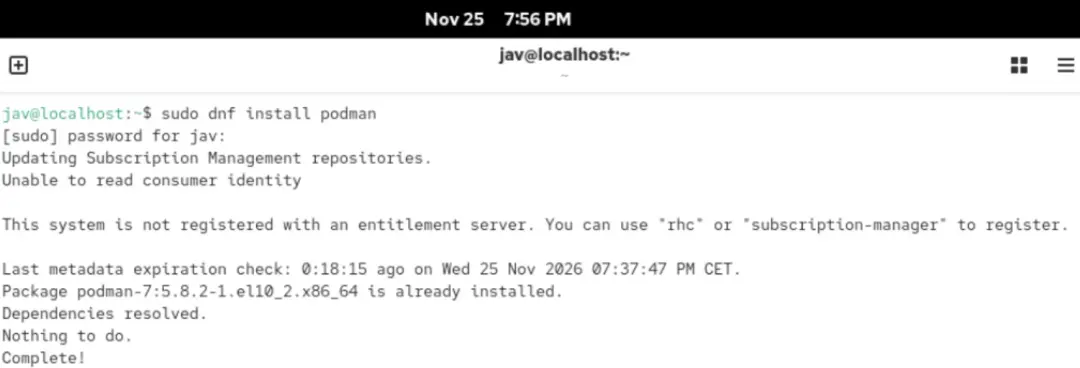

Prepare the folder
I create a folder for the container, with a src subfolder for the program and its tests, and copy the compiler package into it:
mkdir -p ~/cobol-container/src
cd ~/cobol-container
cp ~/IBM_COBOL_V1.2.0_LINUX_EVAL.x86-64.260105.tar.gz .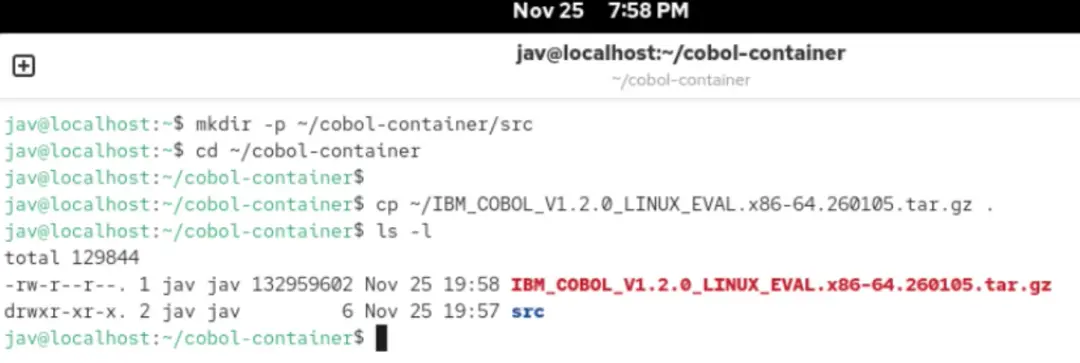
Before building the image, the folder looks like this. The Containerfile and the contents of src are still to be created; I create them in the next steps. I create all the files with nano and paste the content.
~/cobol-container/
├── IBM_COBOL_V1.2.0_LINUX_EVAL.x86-64.260105.tar.gz
├── Containerfile
└── src/
    ├── invoice.cbl
    ├── expected.txt
    └── pipeline.sh
The Containerfile
The Containerfile is the recipe for the image (in Docker it is called Dockerfile). I create the file ~/cobol-container/Containerfile:
FROM registry.access.redhat.com/ubi9/ubi

# IBM COBOL for Linux on x86 trial package
COPY IBM_COBOL_V1.2.0_LINUX_EVAL.x86-64.260105.tar.gz /tmp/

# Dependencies, unpack, install the rpms and clean up
RUN dnf install -y gcc glibc-devel zlib tar gzip diffutils && \
    mkdir /tmp/cobol && \
    tar -xzf /tmp/IBM_COBOL_V1.2.0_LINUX_EVAL.x86-64.260105.tar.gz -C /tmp/cobol && \
    rpm -Uvh /tmp/cobol/images/rhel/*.rpm && \
    ln -s /opt/ibm/cobol/1.2.0/usr/bin/cob2 /usr/bin/cob2 && \
    ln -s /opt/ibm/cobol/1.2.0/etc/cob2.cfg /etc/cob2.cfg && \
    rm -rf /tmp/cobol /tmp/*.tar.gz && \
    dnf clean all

# The source code is mounted here when the container runs
WORKDIR /src

# Compile, run and test the program
CMD ["/bin/bash", "/src/pipeline.sh"]
(Control+O to save the changes. Control+X to exit.)
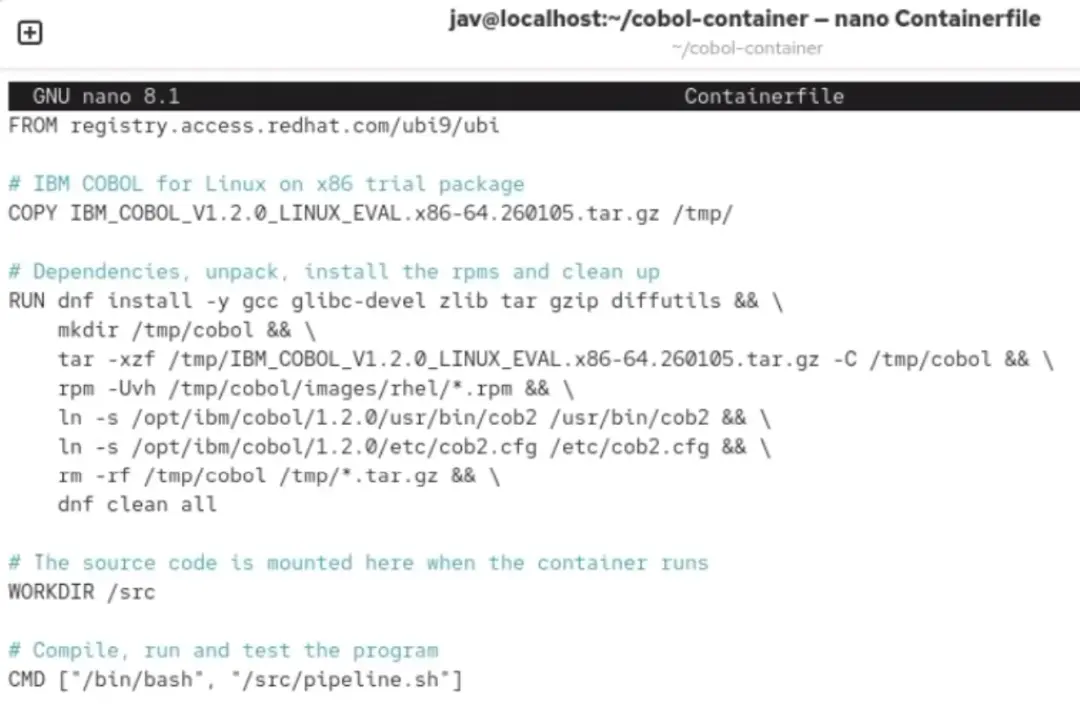
On the virtual machine, the package's install program did two things: install dependencies with dnf and then the compiler packages with rpm (you can see it in its output). In the container I do the same, but by hand: the install program uses sudo, and in the UBI image it is not needed because everything runs as root. I add gcc from the start, which was what was missing on the virtual machine, tar and gzip to extract the package (in UBI they were already installed, as the log shows), and diffutils, which provides the diff command that the test uses. The UBI image does not include diff: in my first tests I had not added it and the pipeline failed with "diff: command not found".
The cob2 links are the same ones I created on the virtual machine.
The program does not go inside the image: when I run the container I mount the src folder, so I can change the program without building the image again.
The COBOL program
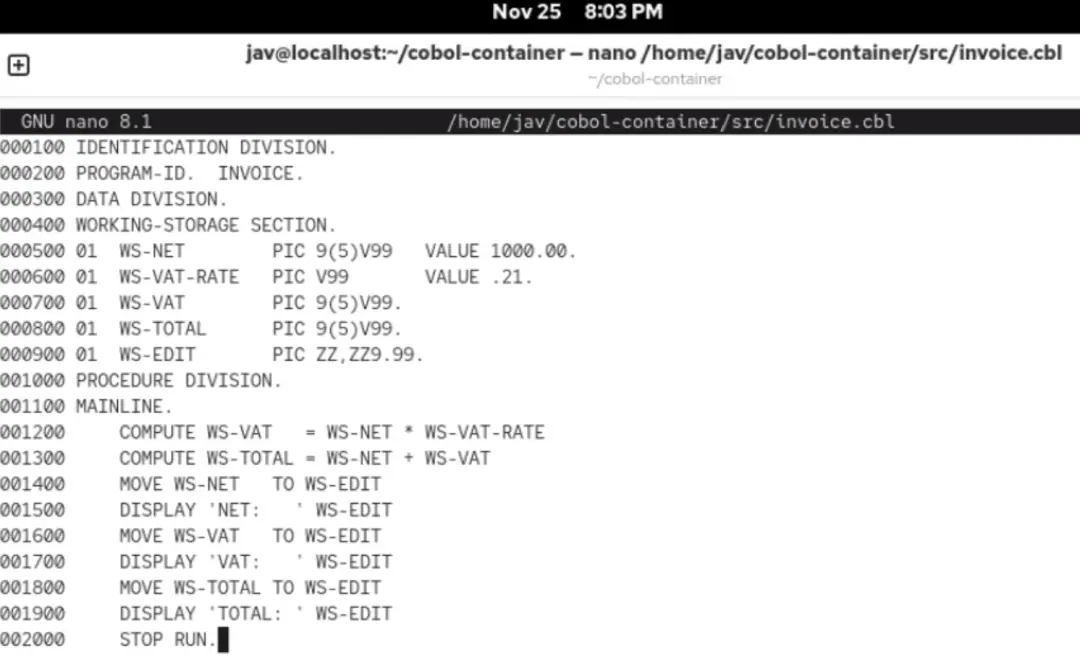
To test something more than a Hello World, I use a program that calculates an invoice: it applies 21% VAT to an amount of 1,000.00 and shows the amount, the VAT and the total. WS-EDIT is an edited field to show the amounts with a thousands separator and a decimal point.
I create the file ~/cobol-container/src/invoice.cbl:
000100 IDENTIFICATION DIVISION.
000200 PROGRAM-ID.  INVOICE.
000300 DATA DIVISION.
000400 WORKING-STORAGE SECTION.
000500 01  WS-NET        PIC 9(5)V99   VALUE 1000.00.
000600 01  WS-VAT-RATE   PIC V99       VALUE .21.
000700 01  WS-VAT        PIC 9(5)V99.
000800 01  WS-TOTAL      PIC 9(5)V99.
000900 01  WS-EDIT       PIC ZZ,ZZ9.99.
001000 PROCEDURE DIVISION.
001100 MAINLINE.
001200     COMPUTE WS-VAT   = WS-NET * WS-VAT-RATE
001300     COMPUTE WS-TOTAL = WS-NET + WS-VAT
001400     MOVE WS-NET   TO WS-EDIT
001500     DISPLAY 'NET:   ' WS-EDIT
001600     MOVE WS-VAT   TO WS-EDIT
001700     DISPLAY 'VAT:   ' WS-EDIT
001800     MOVE WS-TOTAL TO WS-EDIT
001900     DISPLAY 'TOTAL: ' WS-EDIT
002000     STOP RUN.
The expected result
The test compares the program's output with the file ~/cobol-container/src/expected.txt:
NET:    1,000.00
VAT:      210.00
TOTAL:  1,210.00
I write this file myself, with the result calculated by hand (1,000.00 + 21% = 1,210.00), not by copying the program's output. If I copied it from the output, the test would accept any error the program already had.


The pipeline
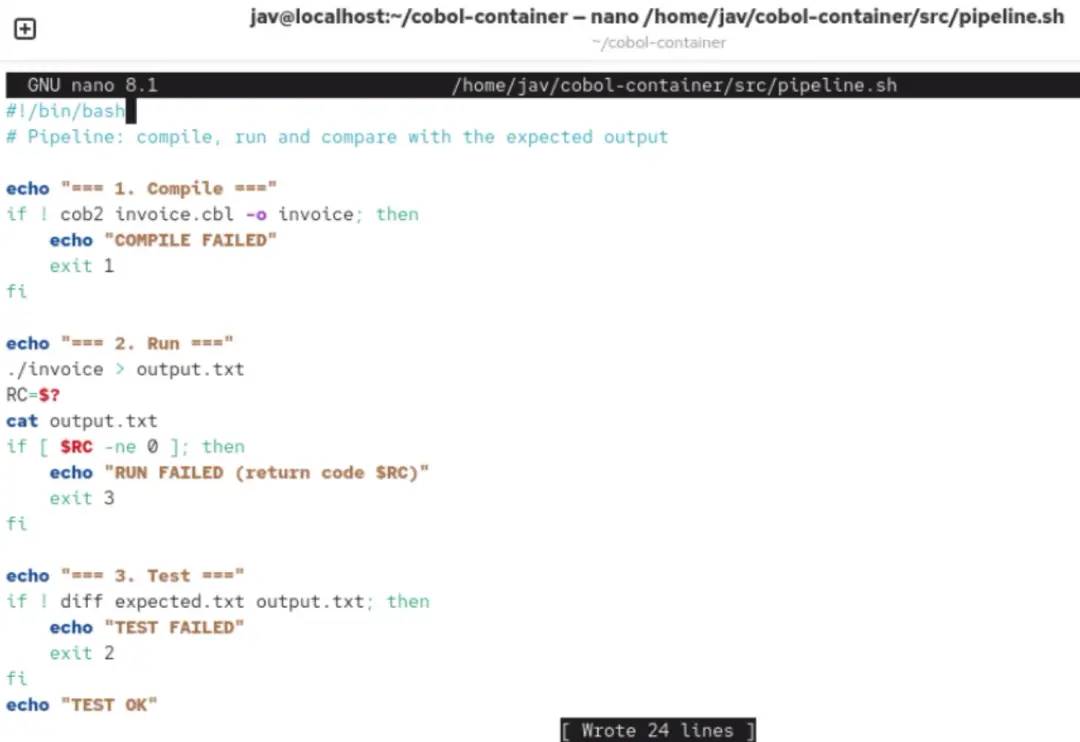
The container runs the pipeline.sh script in the src folder. I create the file ~/cobol-container/src/pipeline.sh:
#!/bin/bash
# Pipeline: compile, run and compare with the expected output

echo "=== 1. Compile ==="
if ! cob2 invoice.cbl -o invoice; then
    echo "COMPILE FAILED"
    exit 1
fi

echo "=== 2. Run ==="
./invoice > output.txt
RC=$?
cat output.txt
if [ $RC -ne 0 ]; then
    echo "RUN FAILED (return code $RC)"
    exit 3
fi

echo "=== 3. Test ==="
if ! diff expected.txt output.txt; then
    echo "TEST FAILED"
    exit 2
fi
echo "TEST OK"
It has three steps:
- It compiles invoice.cbl with cob2. If the compilation fails, it ends with return code 1.
- It runs the program and saves its output in output.txt. If the program ends with a return code other than 0, the script ends with return code 3.
- It compares output.txt with expected.txt using diff. If they are different, diff shows the differences and the script ends with return code 2.
With a different code for each failure, you know at which step it stopped.

Build the image
Building the image needs an Internet connection: Podman downloads the UBI 9 image from registry.access.redhat.com and, during the build, dnf downloads the packages from the UBI repositories. They are free and do not need a subscription: the log shows the warning "This system is not registered" and it still downloads the packages. The local repositories from the virtual machine's ISO are not used inside the container.
cd ~/cobol-container
podman build -t cobol-linux .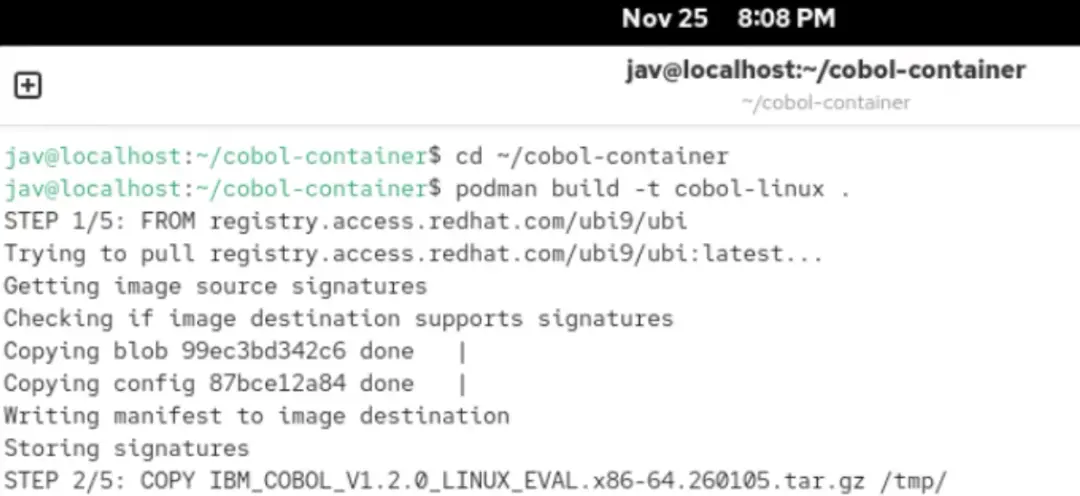
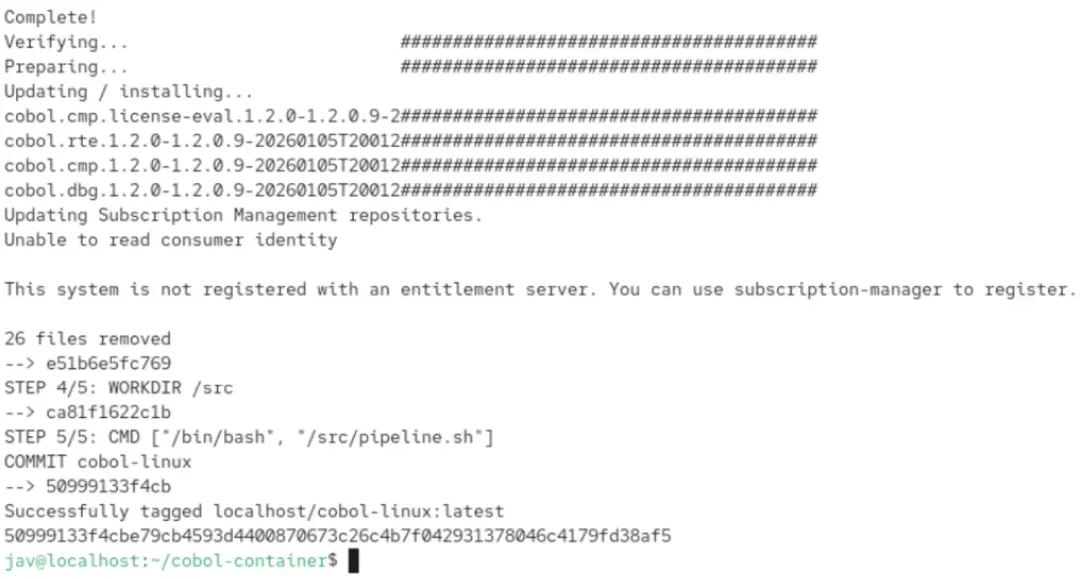
I leave the full log in case someone needs to compare it with their own run. The first time I built the image, Podman downloaded the UBI 9 image (that is the "Trying to pull" in the first screenshot). The log is from a later build, with the UBI image already downloaded, so the download does not appear.
jav@localhost:~/cobol-container$ podman build -t cobol-linux .
STEP 1/5: FROM registry.access.redhat.com/ubi9/ubi
STEP 2/5: COPY IBM_COBOL_V1.2.0_LINUX_EVAL.x86-64.260105.tar.gz /tmp/
--> 598848e8a9ca
STEP 3/5: RUN dnf install -y gcc glibc-devel zlib tar gzip diffutils &&     mkdir /tmp/cobol &&     tar -xzf /tmp/IBM_COBOL_V1.2.0_LINUX_EVAL.x86-64.260105.tar.gz -C /tmp/cobol &&     rpm -Uvh /tmp/cobol/images/rhel/*.rpm &&     ln -s /opt/ibm/cobol/1.2.0/usr/bin/cob2 /usr/bin/cob2 &&     ln -s /opt/ibm/cobol/1.2.0/etc/cob2.cfg /etc/cob2.cfg &&     rm -rf /tmp/cobol /tmp/*.tar.gz &&     dnf clean all
Updating Subscription Management repositories.
Unable to read consumer identity

This system is not registered with an entitlement server. You can use subscription-manager to register.

Red Hat Universal Base Image 9 (RPMs) - BaseOS  6.0 MB/s | 533 kB     00:00
Red Hat Universal Base Image 9 (RPMs) - AppStre  25 MB/s | 3.0 MB     00:00
Red Hat Universal Base Image 9 (RPMs) - CodeRea 5.8 MB/s | 472 kB     00:00
Package zlib-1.2.11-40.el9.x86_64 is already installed.
Package tar-2:1.34-13.el9_8.x86_64 is already installed.
Package gzip-1.12-2.el9_8.x86_64 is already installed.
Dependencies resolved.
=======================================================================================
 Package                      Arch    Version               Repository             Size
=======================================================================================
Installing:
 diffutils                    x86_64  3.7-12.el9            ubi-9-baseos-rpms     402 k
 gcc                          x86_64  11.5.0-17.el9_9       ubi-9-appstream-rpms   32 M
 glibc-devel                  x86_64  2.34-290.el9_9        ubi-9-appstream-rpms   46 k
Installing dependencies:
 binutils                     x86_64  2.35.2-72.el9         ubi-9-baseos-rpms     4.6 M
 binutils-gold                x86_64  2.35.2-72.el9         ubi-9-baseos-rpms     741 k
 cpp                          x86_64  11.5.0-17.el9_9       ubi-9-appstream-rpms   11 M
 elfutils-debuginfod-client   x86_64  0.195-1.el9           ubi-9-baseos-rpms      50 k
 glibc-headers                x86_64  2.34-290.el9_9        ubi-9-appstream-rpms  554 k
 kernel-headers               x86_64  5.14.0-741.27.1.el9_9 ubi-9-appstream-rpms  2.7 M
 libmpc                       x86_64  1.2.1-4.el9           ubi-9-appstream-rpms   65 k
 libpkgconf                   x86_64  1.7.3-10.el9          ubi-9-baseos-rpms      37 k
 libxcrypt-devel              x86_64  4.4.18-3.el9          ubi-9-appstream-rpms   32 k
 make                         x86_64  1:4.3-8.el9           ubi-9-baseos-rpms     541 k
 pkgconf                      x86_64  1.7.3-10.el9          ubi-9-baseos-rpms      45 k
 pkgconf-m4                   noarch  1.7.3-10.el9          ubi-9-baseos-rpms      16 k
 pkgconf-pkg-config           x86_64  1.7.3-10.el9          ubi-9-baseos-rpms      12 k

Transaction Summary
=======================================================================================
Install  16 Packages

Total download size: 53 M
Installed size: 153 M
Downloading Packages:
(1/16): diffutils-3.7-12.el9.x86_64.rpm         7.4 MB/s | 402 kB     00:00
(2/16): binutils-gold-2.35.2-72.el9.x86_64.rpm   11 MB/s | 741 kB     00:00
(3/16): elfutils-debuginfod-client-0.195-1.el9. 4.4 MB/s |  50 kB     00:00
(4/16): libpkgconf-1.7.3-10.el9.x86_64.rpm      5.0 MB/s |  37 kB     00:00
(5/16): pkgconf-1.7.3-10.el9.x86_64.rpm         2.3 MB/s |  45 kB     00:00
(6/16): make-4.3-8.el9.x86_64.rpm                17 MB/s | 541 kB     00:00
(7/16): pkgconf-m4-1.7.3-10.el9.noarch.rpm      3.0 MB/s |  16 kB     00:00
(8/16): binutils-2.35.2-72.el9.x86_64.rpm        45 MB/s | 4.6 MB     00:00
(9/16): pkgconf-pkg-config-1.7.3-10.el9.x86_64. 1.7 MB/s |  12 kB     00:00
(10/16): libmpc-1.2.1-4.el9.x86_64.rpm          9.9 MB/s |  65 kB     00:00
(11/16): libxcrypt-devel-4.4.18-3.el9.x86_64.rp 5.9 MB/s |  32 kB     00:00
(12/16): glibc-devel-2.34-290.el9_9.x86_64.rpm  1.3 MB/s |  46 kB     00:00
(13/16): glibc-headers-2.34-290.el9_9.x86_64.rp  22 MB/s | 554 kB     00:00
(14/16): kernel-headers-5.14.0-741.27.1.el9_9.x  31 MB/s | 2.7 MB     00:00
(15/16): cpp-11.5.0-17.el9_9.x86_64.rpm          36 MB/s |  11 MB     00:00
(16/16): gcc-11.5.0-17.el9_9.x86_64.rpm          71 MB/s |  32 MB     00:00
--------------------------------------------------------------------------------
Total                                            94 MB/s |  53 MB     00:00
Running transaction check
Transaction check succeeded.
Running transaction test
Transaction test succeeded.
Running transaction
  Preparing        :                                                        1/1
  Installing       : libmpc-1.2.1-4.el9.x86_64                             1/16
  Installing       : elfutils-debuginfod-client-0.195-1.el9.x86_64         2/16
  Installing       : binutils-gold-2.35.2-72.el9.x86_64                    3/16
  Installing       : binutils-2.35.2-72.el9.x86_64                         4/16
  Running scriptlet: binutils-2.35.2-72.el9.x86_64                         4/16
  Installing       : cpp-11.5.0-17.el9_9.x86_64                            5/16
  Installing       : kernel-headers-5.14.0-741.27.1.el9_9.x86_64           6/16
  Installing       : glibc-headers-2.34-290.el9_9.x86_64                   7/16
  Installing       : pkgconf-m4-1.7.3-10.el9.noarch                        8/16
  Installing       : make-1:4.3-8.el9.x86_64                               9/16
  Installing       : libpkgconf-1.7.3-10.el9.x86_64                       10/16
  Installing       : pkgconf-1.7.3-10.el9.x86_64                          11/16
  Installing       : pkgconf-pkg-config-1.7.3-10.el9.x86_64               12/16
  Installing       : glibc-devel-2.34-290.el9_9.x86_64                    13/16
  Installing       : libxcrypt-devel-4.4.18-3.el9.x86_64                  14/16
  Installing       : gcc-11.5.0-17.el9_9.x86_64                           15/16
  Installing       : diffutils-3.7-12.el9.x86_64                          16/16
  Running scriptlet: diffutils-3.7-12.el9.x86_64                          16/16
  Verifying        : binutils-2.35.2-72.el9.x86_64                         1/16
  Verifying        : binutils-gold-2.35.2-72.el9.x86_64                    2/16
  Verifying        : diffutils-3.7-12.el9.x86_64                           3/16
  Verifying        : elfutils-debuginfod-client-0.195-1.el9.x86_64         4/16
  Verifying        : libpkgconf-1.7.3-10.el9.x86_64                        5/16
  Verifying        : make-1:4.3-8.el9.x86_64                               6/16
  Verifying        : pkgconf-1.7.3-10.el9.x86_64                           7/16
  Verifying        : pkgconf-m4-1.7.3-10.el9.noarch                        8/16
  Verifying        : pkgconf-pkg-config-1.7.3-10.el9.x86_64                9/16
  Verifying        : libmpc-1.2.1-4.el9.x86_64                            10/16
  Verifying        : libxcrypt-devel-4.4.18-3.el9.x86_64                  11/16
  Verifying        : cpp-11.5.0-17.el9_9.x86_64                           12/16
  Verifying        : gcc-11.5.0-17.el9_9.x86_64                           13/16
  Verifying        : glibc-devel-2.34-290.el9_9.x86_64                    14/16
  Verifying        : glibc-headers-2.34-290.el9_9.x86_64                  15/16
  Verifying        : kernel-headers-5.14.0-741.27.1.el9_9.x86_64          16/16
Installed products updated.

Installed:
  binutils-2.35.2-72.el9.x86_64
  binutils-gold-2.35.2-72.el9.x86_64
  cpp-11.5.0-17.el9_9.x86_64
  diffutils-3.7-12.el9.x86_64
  elfutils-debuginfod-client-0.195-1.el9.x86_64
  gcc-11.5.0-17.el9_9.x86_64
  glibc-devel-2.34-290.el9_9.x86_64
  glibc-headers-2.34-290.el9_9.x86_64
  kernel-headers-5.14.0-741.27.1.el9_9.x86_64
  libmpc-1.2.1-4.el9.x86_64
  libpkgconf-1.7.3-10.el9.x86_64
  libxcrypt-devel-4.4.18-3.el9.x86_64
  make-1:4.3-8.el9.x86_64
  pkgconf-1.7.3-10.el9.x86_64
  pkgconf-m4-1.7.3-10.el9.noarch
  pkgconf-pkg-config-1.7.3-10.el9.x86_64

Complete!
Verifying...                          ########################################
Preparing...                          ########################################
Updating / installing...
cobol.cmp.license-eval.1.2.0-1.2.0.9-2########################################
cobol.rte.1.2.0-1.2.0.9-20260105T20012########################################
cobol.cmp.1.2.0-1.2.0.9-20260105T20012########################################
cobol.dbg.1.2.0-1.2.0.9-20260105T20012########################################
Updating Subscription Management repositories.
Unable to read consumer identity

This system is not registered with an entitlement server. You can use subscription-manager to register.

26 files removed
--> e51b6e5fc769
STEP 4/5: WORKDIR /src
--> ca81f1622c1b
STEP 5/5: CMD ["/bin/bash", "/src/pipeline.sh"]
COMMIT cobol-linux
--> 50999133f4cb
Successfully tagged localhost/cobol-linux:latest
50999133f4cbe79cb4593d4400870673c26c4b7f042931378046c4179fd38af5
I check that the image exists:
podman images
The image takes 649 MB. Although the RUN deletes the compiler package, the package is still inside the image, in the COPY layer. It could be avoided, but for a lab it is good enough for me.
Run the pipeline
podman run --rm -v ./src:/src:Z cobol-linux
echo $?- --rm deletes the container when it ends.
- -v ./src:/src mounts my src folder inside the container, in /src.
- :Z tells Podman to adjust the SELinux label of the folder so that the container can use it. According to the Podman documentation, without that label SELinux (active on RHEL) can prevent the container from using the folder.
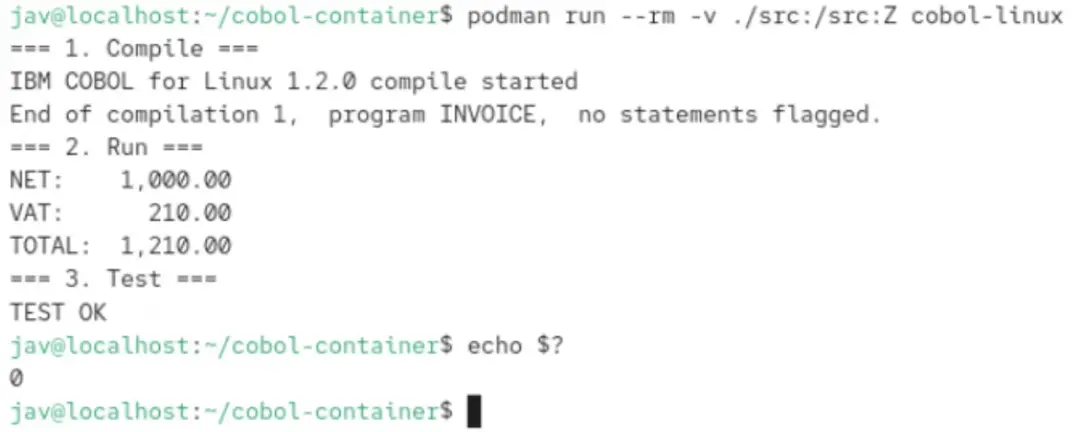
As the folder is mounted, the executable, the compilation listing and the program's output stay in my src folder:
ls -l src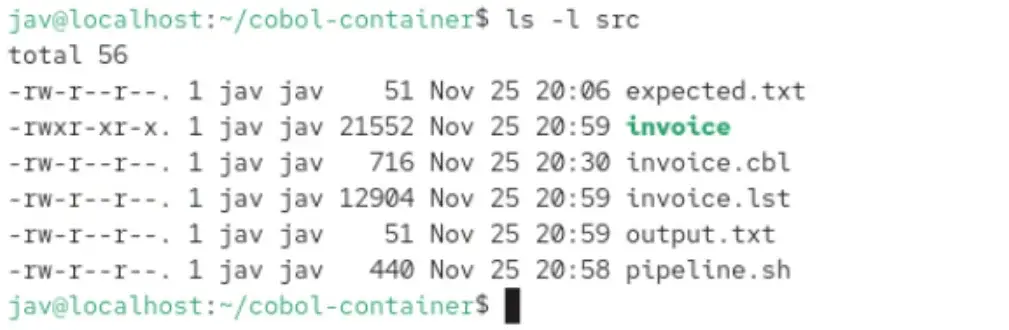
Test a compilation error
I change DISPLAY to DISPLY in the total line and run the container again:
sed -i '/TOTAL: /s/DISPLAY/DISPLY/' src/invoice.cbl
podman run --rm -v ./src:/src:Z cobol-linux
echo $?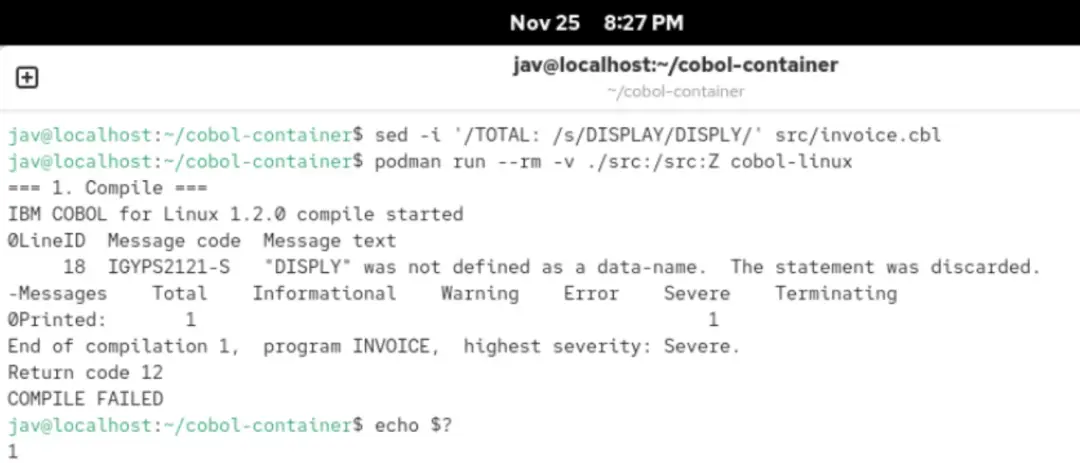
The compiler gives the error IGYPS2121-S and ends with Return code 12 (severe error). The pipeline stops at step 1 and the container's return code is 1.
I put the program back as it was:
sed -i 's/DISPLY/DISPLAY/' src/invoice.cbl
Test a run error
The program compiles and runs, but ends with a return code other than 0. To cause it, I put 8 in RETURN-CODE before STOP RUN:
sed -i 's/STOP RUN/MOVE 8 TO RETURN-CODE STOP RUN/' src/invoice.cbl
podman run --rm -v ./src:/src:Z cobol-linux
echo $?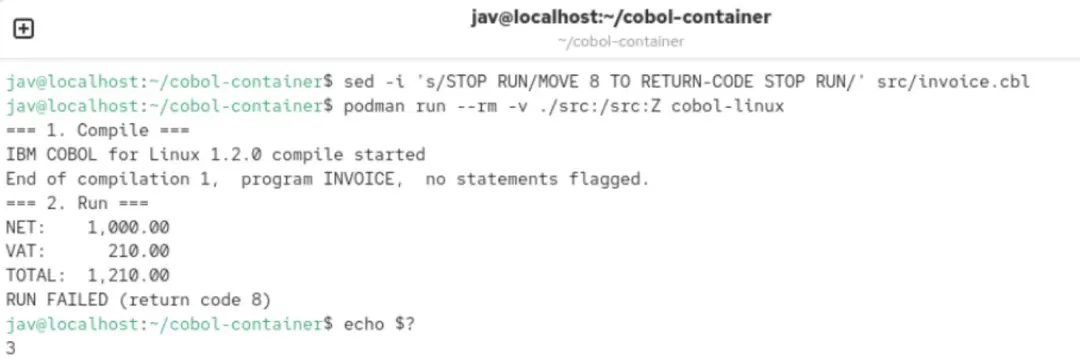
The program shows the amounts, but ends with return code 8. The pipeline writes "RUN FAILED (return code 8)", stops at step 2 and the container's return code is 3.
I put the program back as it was:
sed -i 's/MOVE 8 TO RETURN-CODE STOP RUN/STOP RUN/' src/invoice.cbl
Test a logic error
This is the error the compiler does not see: the program compiles fine, but calculates wrong. I change the addition in the total to a subtraction:
sed -i 's/WS-NET + WS-VAT/WS-NET - WS-VAT/' src/invoice.cbl
podman run --rm -v ./src:/src:Z cobol-linux
echo $?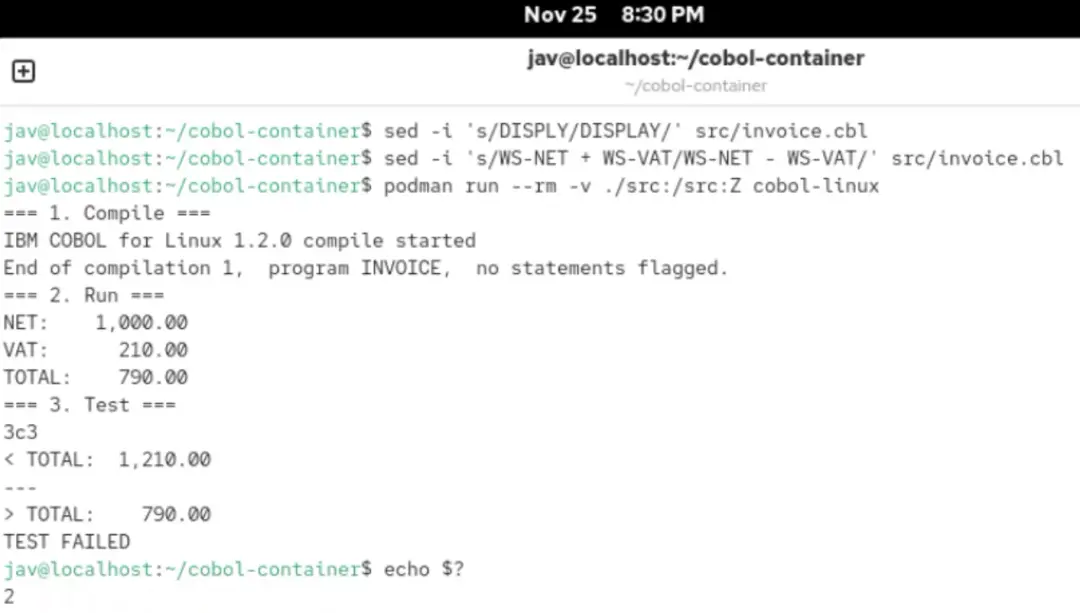
The compilation ends fine, but the total is 790.00 instead of 1,210.00. diff shows the line that does not match (3c3: line 3 is different; < marks the line from expected.txt and > the line in the output) and the return code is 2.
I put the program back as it was:
sed -i 's/WS-NET - WS-VAT/WS-NET + WS-VAT/' src/invoice.cbl
With this I have IBM's COBOL compiler in an image, and a container that compiles, runs and tests the program, and is deleted when it ends.
To delete the image:
podman rmi cobol-linux