D M=CONFIG: detect deviations in device status
Sometimes a device can go offline because of some incident without us noticing. Or, by mistake, devices are brought online in an LPAR where they don't belong.
One way to get a warning when the device configuration is not the expected one is to use the CONFIGxx member and the D M=CONFIG command.
We'll see what CONFIGxx is, how to create it (the ADCD doesn't ship one) and how to detect a device that is not as it should be.
What CONFIGxx is
📖 CONFIGxx (standard configuration list)
It is a PARMLIB member with a list of statements that describes the "good" configuration of the system: processors, storage (central storage), CHPIDs (channels), devices, etc.
It has two uses:
- Compare it with the current configuration: D M=CONFIG(xx).
- Reconfigure some elements of the system so that they are as the member says: CF MEMBER(xx).
There is no IEASYSxx parameter that activates it: the member is given in the command itself. If we don't give a suffix, D M=CONFIG looks for CONFIG00.
The rules are simple: a comment has an * in column 1 and there are no continuations.
📖 Statements and parameters for CONFIGxx
Statements it accepts:
- CPU / CPUAD and CORE: processors (STANDARD, ZAAP, ZIIP or ANY).
- STOR / STORAGE: real storage ranges (central storage).
- CHP: channels (CHPIDs), with STATIC or MANAGED.
- DEV / DEVICE: devices and, optionally, which channels they must be on.
- VOL / VOLUME: which volume must be mounted (and on which device).
- PFID: PCIe functions.
- SWITCH: switch ports for DCM.
- PAV and HPAV: no parameters.
- ESTOR: expanded storage; it doesn't exist in z/Architecture, it is tolerated and ignored.
In this post we'll use DEV, which is the one for disks and tapes. Examples from the manual:
DEV 340-34F,ONLINE
DEV (334,33A),12,ONLINE
DEV (A451,A453,A455),*,ONLINE
The second value (optional) is the CHPIDs the device must be on. With * it only checks that it has at least one path online.
Does the ADCD z/OS V3R1 May Edition of 2024 have a CONFIGxx?
First we check which PARMLIB libraries the system uses:
D PARMLIBOr with the SDSF PARM command.
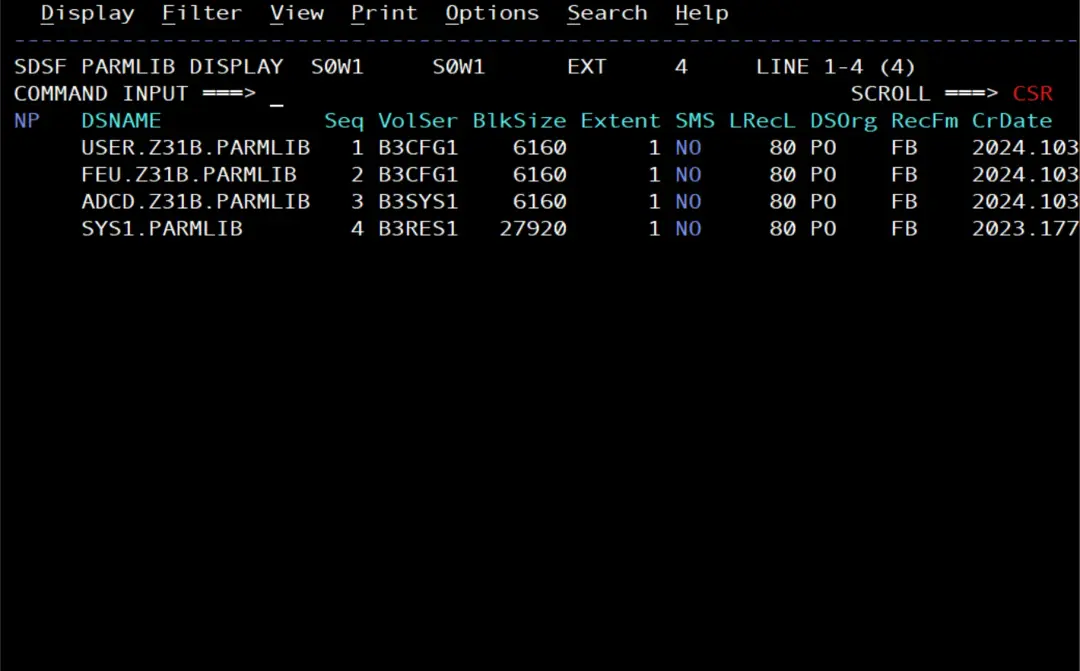
None of them has a CONFIGxx member.
See the devices of the system
To know what to put in the member we need the device addresses. In ZD&T they come from the devmap.
D U,DASD,ONLINE
D U,TAPE,ONLINE
D U,TAPE,OFFLINE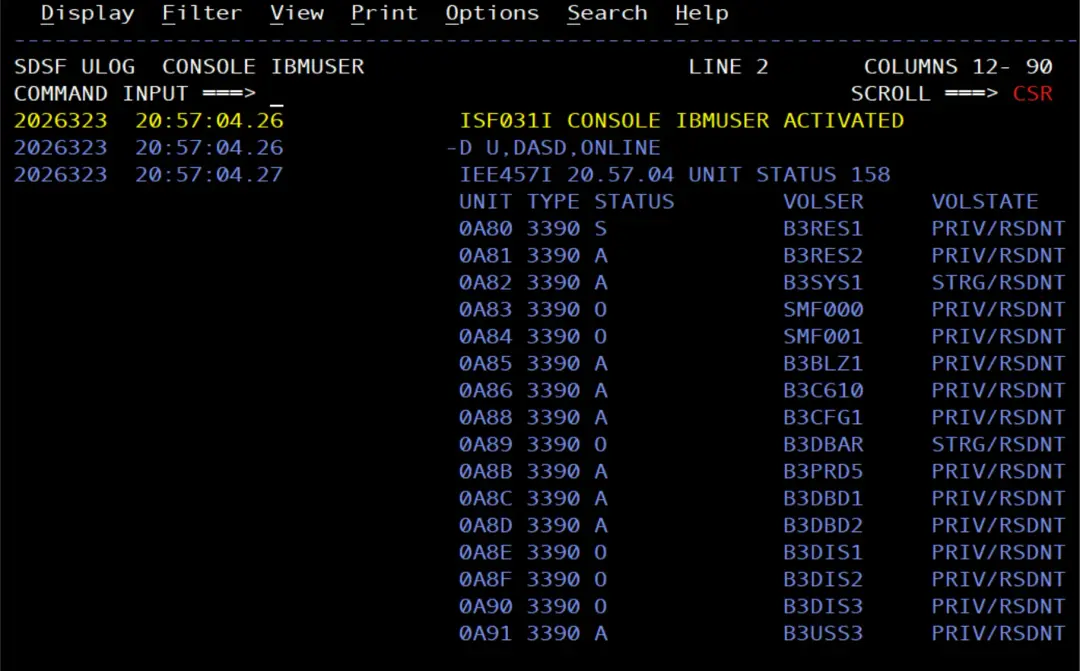
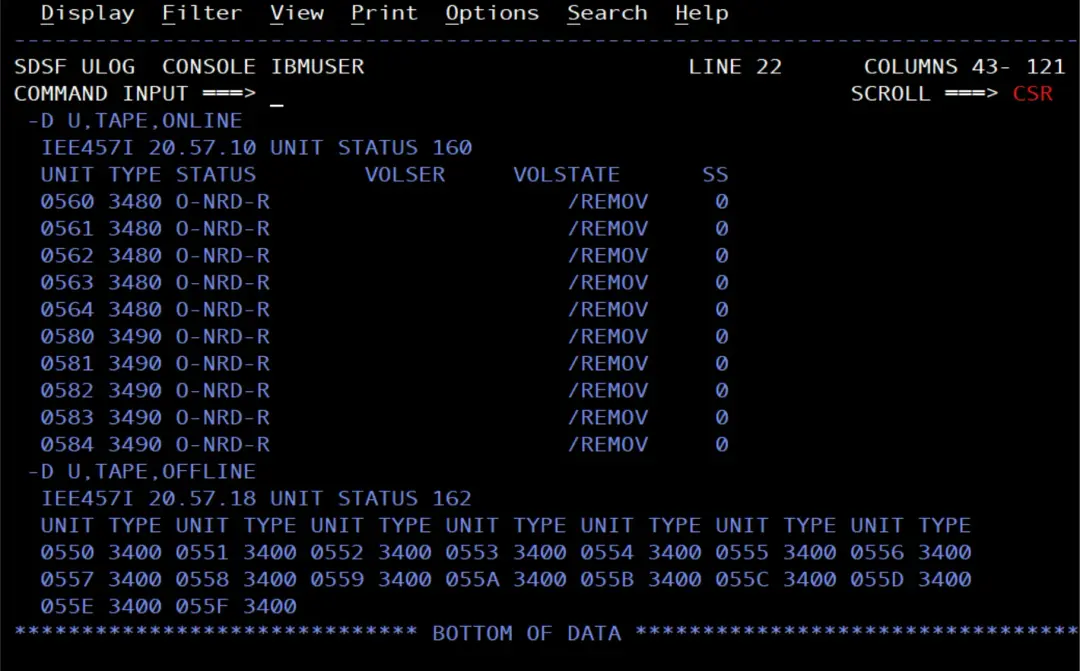
To cause the deviation I'll use a tape drive: nobody has it allocated, so it can be put offline with no problem. With a disk you have to be careful: if someone has it allocated, the VARY stays in pending offline. And never touch B3RES1, B3SYS1 or the paging or spool volumes. In other words, for a test, we'll pick a device that is not disruptive.
Create CONFIG01
Since my system has no CONFIGxx, I'm going to create CONFIG01 in my user PARMLIB (USER.Z31B.PARMLIB).
On the first try I copied the example from the manual (DEV 340-34F,ONLINE). When I checked it, the ACTUAL column showed NOT GEND: those devices are not defined in the IODF of my system.
RESPONSE=S0W1
 IEE097I 20.22.57 DEVIATION STATUS 396
                FROM MEMBER CONFIG01
 DEVICE      DESIRED   ACTUAL
 0340         ONLINE   NOT GEND
 0341         ONLINE   NOT GEND
 0342         ONLINE   NOT GEND
 ...
So I changed it to the disks of my system and added the tape drive 0560:
* CONFIG01 - expected device configuration (ADCD on ZD&T)
* System volumes
DEV 0A80-0A86,ONLINE
* Tape drive used for the test
DEV 0560,ONLINE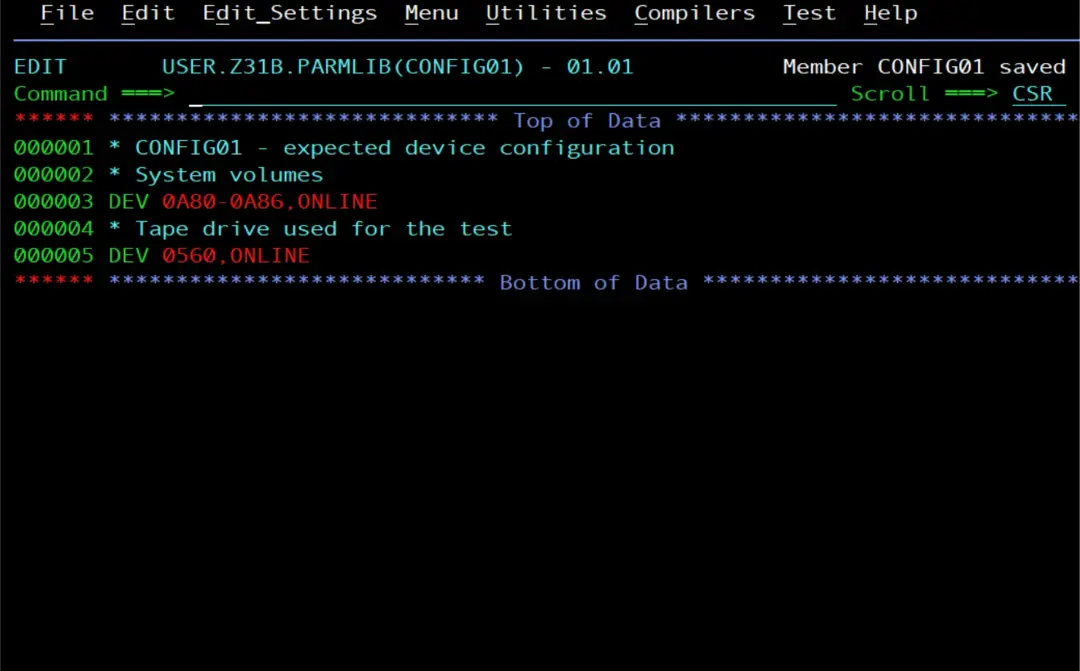
No deviations
D M=CONFIG(01)The result comes in message IEE097I. If everything is as the member says, we'll see:
RESPONSE=S0W1
 IEE097I 21.10.23 DEVIATION STATUS 834
                FROM MEMBER CONFIG01
NO DEVIATION FROM REQUESTED CONFIGURATION 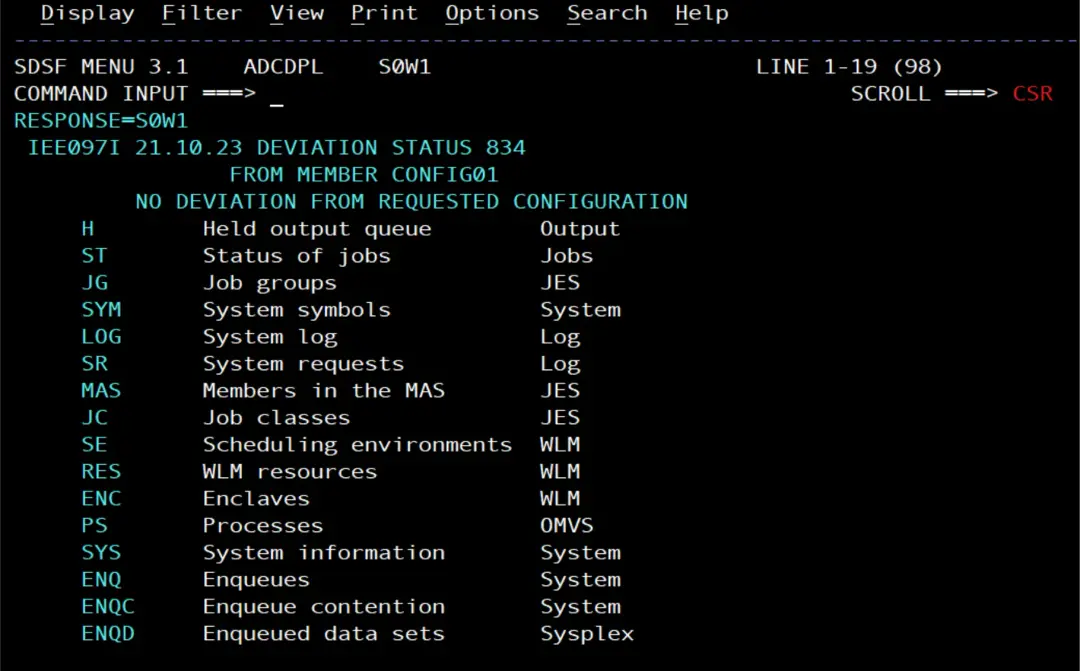
Cause a deviation
Now I put the tape drive offline and check again:
V 0560,OFFLINE
D M=CONFIG(01)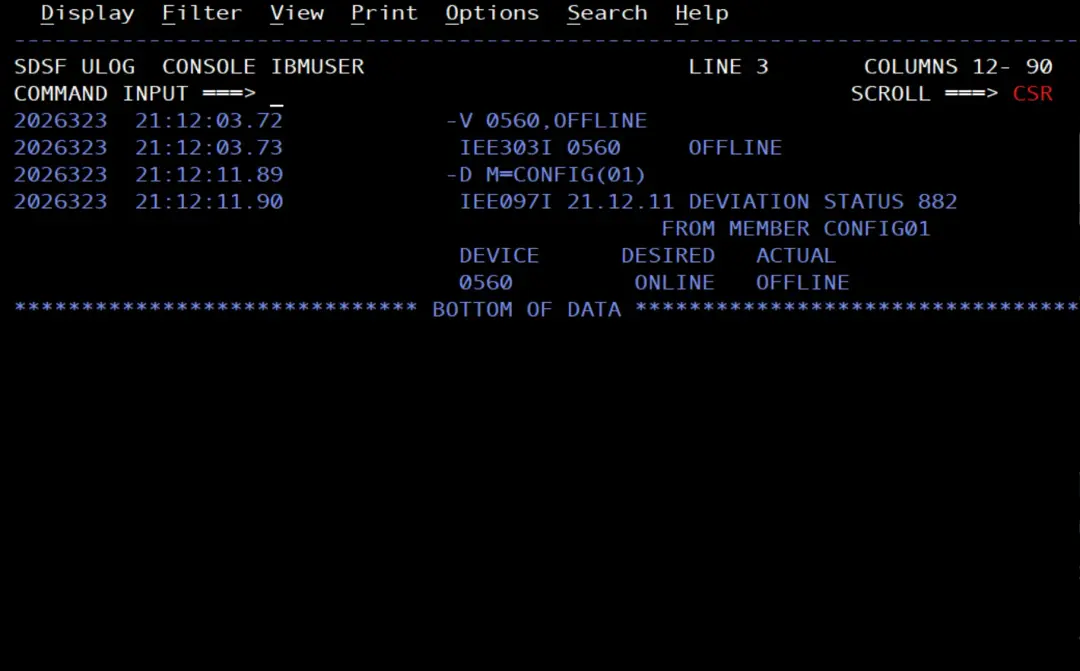
Fix it
📖 Reconfiguring the system with a CONFIGxx parmlib member
There is the CF MEMBER(xx) command, but it doesn't work for this: according to the manual, the DEV and VOL statements are only used for verification, not for reconfiguration. CF MEMBER reconfigures processors, storage, PFIDs, channels and switches, and it can only be issued from a console with master authority. Device deviations are fixed one by one.
But before touching anything, you have to find out why the device is not as it should be. For example:
- Someone put it offline by mistake.
- There is a channel failure and that is why it is offline.
- Someone is working with it: for example, a disk we left offline to initialize it. If the automation that runs the check fires right then, it will report the deviation even though it is planned work.
- A change was made to the system (for example, those units are going to be removed) and the CONFIGxx has not been updated yet. In that case what has to be fixed is the member, not the device.
In my case I put it offline myself for the test. To bring it back online, the good old VARY:
V 0560,ONLINE
D M=CONFIG(01)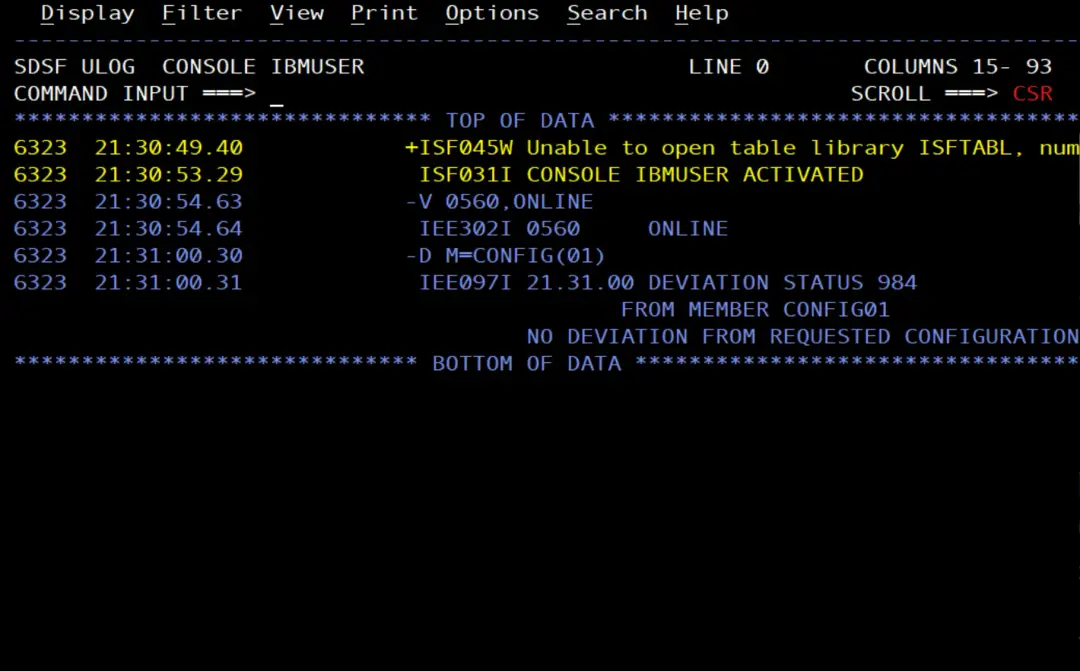
Generate it from HCD (not possible on the ADCD)
On a real system you don't need to write the member by hand: HCD has the "Build CONFIGxx member" function, which creates it from the production IODF with CHP, DEVICE and SWITCH statements. It can also be done in batch with the CBDMGHCP program.
📖 z/OS 3.1 HCD User's Guide (PDF): chapter 13, "How to invoke HCD batch utility functions". The CBDMGHCP parameters are in "Input parameter string" (p. 294) and those for CONFIG,XX in "Build I/O configuration data" (pp. 305-307).
PARM='CONFIG,XX,xx,procid,partition_id,osid,U|R,backup'On the ADCD the test is not possible: in ZD&T the hardware is emulated and my IODF has no processor defined, only the operating system configuration with its devices. The processor is required in the PARM and whichever one I give won't exist in the IODF, so HCD ends with the message:
CBDA632I Processor procid does not exist.That's why here we write the CONFIGxx by hand, with DEV statements only.
Example job for a real system
This job is not used on the ADCD. I couldn't run it all the way through: on the ADCD the BUILD step ends with CBDA632I, as I explain above.
//BLDCONF  JOB (ACCT),'BUILD CONFIGXX',CLASS=A,MSGCLASS=X
//* Delete the work PDS from a previous run (RC 0 if not found)
//DELETE   EXEC PGM=IDCAMS
//SYSPRINT DD SYSOUT=*
//SYSIN    DD *
  DELETE IBMUSER.HCD.CONFIG
  SET MAXCC=0
/*
//* Allocate a work PDS for the generated member
//ALLOC    EXEC PGM=IEFBR14
//WORKPDS  DD DSN=IBMUSER.HCD.CONFIG,DISP=(NEW,CATLG),
//            UNIT=SYSDA,SPACE=(TRK,(5,5,5)),
//            DSORG=PO,RECFM=FB,LRECL=80,BLKSIZE=27920
//* Build CONFIG02 from the production IODF
//BUILD    EXEC PGM=CBDMGHCP,
//            PARM='CONFIG,XX,02,procid,partition_id,osid,R'
//HCDIODFS DD DSN=SYS1.IODFxx,DISP=SHR
//HCDDECK  DD DSN=IBMUSER.HCD.CONFIG,DISP=OLD
//HCDMLOG  DD SYSOUT=*
//* Copy CONFIG02 into the user PARMLIB (R replaces it if it exists)
//COPY     EXEC PGM=IEBCOPY,COND=(4,LT)
//SYSPRINT DD SYSOUT=*
//IN       DD DSN=IBMUSER.HCD.CONFIG,DISP=SHR
//OUT      DD DSN=USER.Z31B.PARMLIB,DISP=SHR
//SYSIN    DD *
  COPY OUTDD=OUT,INDD=IN
  SELECT MEMBER=((CONFIG02,,R))
/*
HCD needs the output PDS for exclusive use (DISP=OLD). Pointing it directly at my PARMLIB gives CBDA020I: it is in the system's PARMLIB concatenation, which has it allocated as shared (SHR). With a temporary data set (&&) it gives CBDA058I. That's why it is generated in an intermediate PDS and copied with IEBCOPY.
What it is for, day to day
- After an IPL or a change to the IODF, a D M=CONFIG(xx) tells us in seconds if something is missing.
- It could be issued automatically after the IPL (COMMNDxx) or at regular intervals with a JES2 automatic command (Automatic commands on z/OS: schedule commands with $TA). But that way the response only stays in the console and the SYSLOG: the right thing is to include it in some automated process that, if IEE097I shows units in a state that is not the expected one, sends us a warning.
Summary
- CONFIGxx describes how the system should be. The ADCD doesn't ship one: we create it with DEV statements.
- D M=CONFIG(xx) compares with the current configuration and shows the differences in IEE097I (NOT GEND if the device doesn't exist in the IODF).
- For a device, V dddd,ONLINE. CF MEMBER(xx) doesn't act on DEV statements: it reconfigures processors, storage, PFIDs, channels and switches.
References (z/OS 3.1)
- CONFIGxx (standard configuration list) (MVS Initialization and Tuning Reference)
- Statements and parameters for CONFIGxx (MVS Initialization and Tuning Reference)
- Syntax rules for CONFIGxx (MVS Initialization and Tuning Reference)
- Displaying system configuration information (M) (MVS System Commands)
- CONFIG command (MVS System Commands)
- Reconfiguring the system with a CONFIGxx parmlib member (MVS System Commands)
- z/OS 3.1 HCD User's Guide (PDF): chapter 13, "How to invoke HCD batch utility functions"
- IEE097I: z/OS MVS System Messages, Vol 7 (IEB-IEE) (PDF)